
 Labels:
Gadget,
Internet,
Social,
Web
at
12/12/2009 09:04:00 PM
Labels:
Gadget,
Internet,
Social,
Web
at
12/12/2009 09:04:00 PM
 It wasn't supposed to exist. "The" Google Phone. Then we (and others) heard otherwise. And now, Google isn't just handing this "sexy beast" out to employees, they're going to sell it directly. Everything has changed. Here's what we know.
• The Wall Street Journal says it's made by HTC and called the Nexus One. It'll be sold online, directly by Google. You'll have to get your own cell service (which suggests it's an unlocked device). Curiously, the WSJ says, "unlike the more than half-dozen Android phones made by phone manufacturers today, Google designed virtually the entire software experience behind the phone." Sounds weird, since they designed the look and feel of the software on the Droid and G1 too, except that our source had told us before that the current Android we know isn't the "real" Android. Also odd sounding: that name, Nexus One. But maybe not that odd.
• Google confirmed they handed out "a device that combines innovative hardware from a partner with software that runs on Android to experiment with new mobile features and capabilities and we shared this device with Google employees across the globe."
• A bunch of Google employees tweeted stuff like the phone is "like an iPhone on beautifying steroids."
• It probably looks like this:

• It's supposedly an unlocked GSM phone running Android 2.1, powered by the crazyfast Snapdragon processor, with an OLED touchscreen (no keyboard), dual mics (for killing background noise), and enhanced voice-to-text powers. It's gonna be alllll Google branding. And it's probably coming out in January. Which jives with what our source saw a couple weeks ago, a huge screen running a brand new version of Android unlike anything out there.
• We heard it was referred to, at least in some capacity in the staff meeting where they were handed out, as the "Passion."
If Google really is going to push this as The Google Phone (and it's not just a dev phone), it's hard to understate just how radically this changes the landscape not just for Android, but what it means for Google and their relationship to the cellphone industry. The Google Phone would be a radically different model, a shift from the Microsoft one—make the software, let somebody else deal with the hardware—to the Apple and BlackBerry one—make the software and the hardware, tightly integrated. And Google's even taking a step further, by selling it directly, bypassing the carriers, at least initially. (Google would not be the first to sell a high-powered unlocked phone—see Sony Ericsson and Nokia—but neither them are, um, Google, and their well-known failures with that approach makes it even ballsier.)
It's a powerful message: to the companies making phones running Android, to the carriers, to developers, to consumers. Google is in this, to win. Everything has changed. You know, unless it hasn't.
Labels:
Internet,
Social
at
12/12/2009 08:56:00 PM
Sometime back, we linked to several services and tools that let you transform decent people into mischievous wonders. The online tools allowed you to blacken anybody’s eye or add curly hair. Adding a long, witch-like nose or turning people into a Star Wars character is been made as easy as a pie, thanks to the internet and its marvels. Services like these keep popping up, each with its own star-factor. We’ve got two of these covered today.
 Funtastic Face is the place to reach out if you need a cosmetic surgery. Seriously. This is the hub for all face related effects. Need an extra jaw, eye wear, hair, noses or if you’d like some punches on your eyes, they have bruises too. Everything is covered. The application is built with flash. Photos can be uploaded, snapped from a webcam or gotten off your facebook profile (login required). Check out how I adorned Brad Pitt. He looks attractive, doesn’t he, girls?

Funtastic Face
 Funtastic Face is the place to reach out if you need a cosmetic surgery. Seriously. This is the hub for all face related effects. Need an extra jaw, eye wear, hair, noses or if you’d like some punches on your eyes, they have bruises too. Everything is covered. The application is built with flash. Photos can be uploaded, snapped from a webcam or gotten off your facebook profile (login required). Check out how I adorned Brad Pitt. He looks attractive, doesn’t he, girls?
GrossOut
…is the place to get gross.On GrossOut, you can add all kinds of filthy slimes, nasty things, dirty bandages, patches to your beautiful faces. Or perhaps ruin somebody else’s. The app is flash material and you can take photos direct from your webcam i.e. if you wish to ruin your own face, otherwise, you can upload pictures from your computer. We selected Tiger Woods for our experiment. And look! The world still has his smile!
Labels:
Internet,
Social,
Web
at
12/11/2009 05:24:00 AM

Just a few days ago we heard rumours about the imminent sale of Friendster, one of the first-generation social networks that originally kicked off the craze. Through self-reinvention the site has managed to stay relevant to a large audience in Asia, although its influence has notably diminished in the West over the years since its founding in 2002 and heydey in 2003-4.
There aren’t too many details emerging yet, but Business Times is reporting that the deal is finalized with a sale to MOL Global, a Malaysian e-commerce company that Friendster has been working with since October to power its payments platform. MOL Global CEO Ganesh Kumar Bangah took the stage at a signing ceremony today in Kuala Lumpur to announce an expected influx of $110 million yearly revenue from the acquisition.
This deal makes sense given Friendster’s audience and the current playing field for social networking in Asia, where Friendster has more monthly uniques than any other network. We expect this combination of assets to lead Friendster deeper into a microtransaction-type revenue strategy, perhaps involving a greater focus on social gaming moving forward.
Social gaming is becoming a significant revenue play for social networks worldwide, in the U.S. with companies like Zynga, EA’s Playfish and Playdom pulling down multimillions in annual revenues from games on Facebook and MySpace, and in Latin America where hi5 is aggressively pursuing its successful social gaming strategy as well.
It’s difficult to judge just how much the deal makes sense until we see the actual financial numbers, but it could be a decent exit for Friendster after a long and challenging road.
Did you use Friendster back in the day?
Labels:
Internet,
Software,
Web
at
12/08/2009 09:10:00 PM
 Google's extension gallery for its Chrome browser opened for business this morning. We've taken a look around the offerings—most of them, anyways—and pulled out a few picks that deserve a spot in your formerly pristine browser.
Actually, rating these extensions by "worth the slowdown," as is often the case with Firefox, doesn't seem applicable here. Chrome renders pages just as snappily on a Linux install with eight extensions loaded, and the memory use seems not all that different. Your mileage may certainly vary.
We pulled out extensions from the gallery for highlighting that do something a bit different from widely-available bookmarklets, or at least fill a crucial need for those who use the web productively. You can disagree with our picks or tell us how blind we must be to miss a great one—do so in the comments, and if we missed a really great one, we'll update the post.
You need to be running either the Windows dev version of Chrome, the just-released Linux beta, or a daily build that supports extensions. Mac users are, unfortunately, left out of the add-on party for the moment.

Google Mail Checker: Just what it sounds like. It sits in your address bar, keeps track of your unread messages, and opens Gmail when you click it. Take note that the author states it "does not yet work well" with Google Apps mail.

RSS Subscription Extension: Puts an RSS icon in the address bar when standard feeds are detected, and delivers the feed to a reader selection page when clicked. You can add custom readers beyond the standard five using URL syntax.

Xmarks for Chrome Beta: Just like the early Chrome alpha, this extension ties Chrome into your Xmarks bookmark account, synchronizing you between Chrome, Firefox, Safari, Internet Explorer, and across multiple profiles, if needed.

iMacros for Chrome: We haven't had nearly enough time to discover what this cool tool is capable of, but it seems like a nice solution for anyone missing their crucial Greasemonkey scripts and other Firefox-only helpers.
 Aviary Screen Capture and Picnik Extension for Chrome: We've already spilled some digital ink on the neat Aviary extension, but Picnik does the same type of instant web page capture—and also lets you pick a particular image from a quick list that pops down.
 Flash Block and FlashBlock: Both do the basic task of turning off Flash on all web pages, until you turn it back on for all pages from that domain. FlashBlock uses a keyboard shortcut, while Flash Black has a settings dialog with a list you can edit.
AdThwart and AdSweep: As you might guess, they both block ads, though they use different blacklists to do so. We've previously covered AdSweep in its early days. At the moment, AdSweep's gallery page returns an installation failure—from Linux, at least. AdThwart is proving more popular, perhaps due in part to AdSweep's troubles.
 Brizzly: The helpful, time-saving, at-a-glance Twitter/Facebook client for the web integrates smoothly into Chrome. Click the button, and you get a quick read on what's happening in your social streams, with images automatically shown and videos embedded. You can, of course, also tweet or update Facebook from here.
Google Voice Notifier, Google Wave Notifier, and Google Alerter: The first two do just what you'd think they do, but make lots of sense for services you want right away and might only occasionally check, respectively. The last is a kind of uber-notifier that checks Gmail, Wave, and Reader for new items. If you're a heavy Reader user, you'll obviously want to turn those pings off in the settings.
 Chromium Delicious Plugin: All your recent bookmarks from the Delicious bookmark service, as well as quick saving of bookmarks from selected text/links or manual creation.
ChromeMilk: There are many, many tools that bring to-do manager Remember the Milk into your browser, but this one's notable for popping up your task list right from the address bar—and offering Remember the Milk's very slick iPhone interface as an option for pro membership owners.
Labels:
Internet,
Software
at
12/08/2009 09:07:00 PM
Along with the Google Chrome for Mac and Linux versions today Google also announced the availability of extensions in beta. If you are running a beta version of Google Chrome you can install extensions now. The extensions are available for both Windows and Linux versions from today, but Mac users have to wait a while to get the extensions.
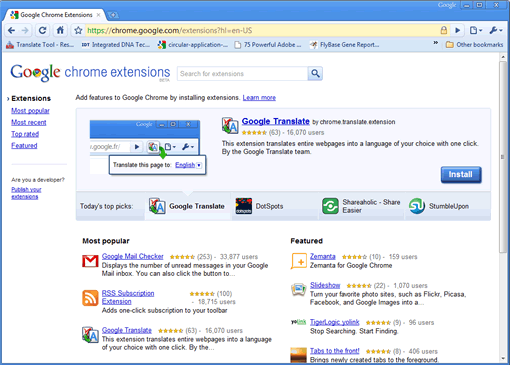
Lack of extensions on Google Chrome is one of the reason many Firefox fans are reluctant to move to Google Chrome although chrome is speedier than Firefox. Today with the launch of extensions Google chrome will gain some Firefox fans also. Google has launched an extensions gallery which contains 300 extensions as of now, but the number will increase soon as more people install extensions and this will boost developer activity.
If you are worried about Google chrome speed after installing extensions, Google says ”Chromium’s extensive performance monitoring infrastructure has helped us ensure extensions affect Google Chrome’s speed as little as possible.” So that’s a good news, but we will know for sure in the coming days how the extensions are affecting the overall speed of the Google Chrome browser.
Installing extensions is easy, no need of restarting the browser like Firefox. Click the install button and you are good to go.
Google Chrome Extensions Gallery
Lack of extensions on Google Chrome is one of the reason many Firefox fans are reluctant to move to Google Chrome although chrome is speedier than Firefox. Today with the launch of extensions Google chrome will gain some Firefox fans also. Google has launched an extensions gallery which contains 300 extensions as of now, but the number will increase soon as more people install extensions and this will boost developer activity.
If you are worried about Google chrome speed after installing extensions, Google says ”Chromium’s extensive performance monitoring infrastructure has helped us ensure extensions affect Google Chrome’s speed as little as possible.” So that’s a good news, but we will know for sure in the coming days how the extensions are affecting the overall speed of the Google Chrome browser.
Installing extensions is easy, no need of restarting the browser like Firefox. Click the install button and you are good to go.
Google Chrome Extensions Gallery
Labels:
Gadget,
Internet,
Web
at
12/08/2009 09:05:00 PM
From the web news had I read,The JooJoo{Crunchpad} looks really cool and amazing.But its just barely working. We can say that Fusion Garage executed an internet tablet quite well.

I had some new facts I gathered from the meeting. First, the device runs a 1.6GHz Atom processor with 1GB RAM. The guys at JooJoo said they weren't ready to reveal specs yet, but I saw the bootup sequence—a standard BIOS setup that displayed what it was booting to—and saw the specs. Chandra, CEO of Fusion Garage, says that the demo hardware was basically the final hardware, so it's easy to put two and two together.
As for the graphics card + CPU combination, it's probably an Nvidia Ion chipset. They claim that it handles 1080p YouTube video fine—we only got to see a few seconds of 720p and 1080p HD YouTube video because the internet connection was acting up—so it's probably an Ion. But the HD video we tested looked just fine on its 12-inch, 1366x768 resolution screen. Again, the Ion chipset is just an educated guess, but there are few other hardware options that can handle 1080p video smoothly, and an Atom CPU by itself (which we did see) can't do it on its own.
There is a headphone Jack, a microphone jack, a built-in webcam at 1.3 megapixels, a charging port and a USB slot. The external card slot present in the prototype isn't going to make it to the final version, but they are thinking of making it available to put a 3G card in there in the future. No TV out/HDMI out yet, but they are thinking about that. There are built-in speakers for playing back audio without headphones, and they're decent enough that you can actually listen to them, but you'll want to plug them in to speakers for any kind of extended video consumption.
Performance
The tablet actually handled pretty well, with browsing web pages, transitioning between tabs (windows) and opening up new web pages working fine. There's an accelerometer in there to detect between vertical and horizontal orientations.
The body is solid, sturdy and graced with a bright 12-inch screen. The back is curved and made of a plastic that feels nice in your hand, and the whole thing doesn't seem too heavy to prop up on a bed or a toilet.
In short, it's an actual web browsing tablet that you'd be perfectly fine using.

Software that been use by the tablet are basically a gateway to your browser, which is based off WebKit, the same code that powers Safari and Google's Chrome. It's fast, and handles gestures (pinching to go back a level, swiping to move up and down) just fine. There are other gestures that will be included in the final build, like two finger swiping for going back and forth in history and a bookmark swipe, but we didn't get to see that. But, you can't zoom into text. That's partially because the pinching is already used for going in and out of your windows into the home screen, but also partially because the screen is 12 inches. You don't need to really zoom into text on a laptop-sized screen of 12 inches. And they also said they may make LARGER sized tablets as well, with 12 being their smallest size.
JooJoo's keyboard looks like this, and takes up only a portion of the screen. It's usable, but you don't want to use it to bang out a blog post; this is mainly for consuming media.
Fusion Garage's concept for the product is that the "internet is the application", which means you can't save photos or files locally and you can't access any of the 4GB of storage to do any user level stuff. The most you can dictate is how much each internet application (e.g. Gmail or Google Wave) can have for a local cache.
It does support Flash as usual, except when you play HD Flash it'll force you into fullscreen mode to render better/faster. And if you want to read PDFs, it'll force you into Google's web-based PDF doc reader. So it handles PDFs, but not "natively".
Your home screen is composed almost entirely of icons—shortcuts—to web applications. The screen is customizable with your own applications, eventually, and has a weird feature where it displays a different color background whenever you go back to it. Fusion Garage is thinking of taking this out, or swapping it with some other feature.
As for multitasking, Fusion Garage says that they will have specific APIs available to webapps to incorporate in order to pass notifications up to the user. For example, if Twitter refreshes in another window and you're watching a YouTube video, a popup will show and tell you you have something else going on. The APIs will be available at launch, but it's up to websites to support them.
So right now we're at a wait and see status. The JooJoo seems good, from our time with it, but it really needs to be taken home and thoroughly tested with different webapps, watching a lot of HD video and streaming music. At the very least, we'll see how much of that 5-hour battery life stands up to constant use. You can pre-order it yourself this Friday, but, since there's some legal troubles on the horizon, you probably want to wait until the whole thing clears up first before putting any money down. [JooJoo]
I had some new facts I gathered from the meeting. First, the device runs a 1.6GHz Atom processor with 1GB RAM. The guys at JooJoo said they weren't ready to reveal specs yet, but I saw the bootup sequence—a standard BIOS setup that displayed what it was booting to—and saw the specs. Chandra, CEO of Fusion Garage, says that the demo hardware was basically the final hardware, so it's easy to put two and two together.
As for the graphics card + CPU combination, it's probably an Nvidia Ion chipset. They claim that it handles 1080p YouTube video fine—we only got to see a few seconds of 720p and 1080p HD YouTube video because the internet connection was acting up—so it's probably an Ion. But the HD video we tested looked just fine on its 12-inch, 1366x768 resolution screen. Again, the Ion chipset is just an educated guess, but there are few other hardware options that can handle 1080p video smoothly, and an Atom CPU by itself (which we did see) can't do it on its own.
There is a headphone Jack, a microphone jack, a built-in webcam at 1.3 megapixels, a charging port and a USB slot. The external card slot present in the prototype isn't going to make it to the final version, but they are thinking of making it available to put a 3G card in there in the future. No TV out/HDMI out yet, but they are thinking about that. There are built-in speakers for playing back audio without headphones, and they're decent enough that you can actually listen to them, but you'll want to plug them in to speakers for any kind of extended video consumption.
Performance
The tablet actually handled pretty well, with browsing web pages, transitioning between tabs (windows) and opening up new web pages working fine. There's an accelerometer in there to detect between vertical and horizontal orientations.
The body is solid, sturdy and graced with a bright 12-inch screen. The back is curved and made of a plastic that feels nice in your hand, and the whole thing doesn't seem too heavy to prop up on a bed or a toilet.
In short, it's an actual web browsing tablet that you'd be perfectly fine using.
Software that been use by the tablet are basically a gateway to your browser, which is based off WebKit, the same code that powers Safari and Google's Chrome. It's fast, and handles gestures (pinching to go back a level, swiping to move up and down) just fine. There are other gestures that will be included in the final build, like two finger swiping for going back and forth in history and a bookmark swipe, but we didn't get to see that. But, you can't zoom into text. That's partially because the pinching is already used for going in and out of your windows into the home screen, but also partially because the screen is 12 inches. You don't need to really zoom into text on a laptop-sized screen of 12 inches. And they also said they may make LARGER sized tablets as well, with 12 being their smallest size.
JooJoo's keyboard looks like this, and takes up only a portion of the screen. It's usable, but you don't want to use it to bang out a blog post; this is mainly for consuming media.
Fusion Garage's concept for the product is that the "internet is the application", which means you can't save photos or files locally and you can't access any of the 4GB of storage to do any user level stuff. The most you can dictate is how much each internet application (e.g. Gmail or Google Wave) can have for a local cache.
It does support Flash as usual, except when you play HD Flash it'll force you into fullscreen mode to render better/faster. And if you want to read PDFs, it'll force you into Google's web-based PDF doc reader. So it handles PDFs, but not "natively".
Your home screen is composed almost entirely of icons—shortcuts—to web applications. The screen is customizable with your own applications, eventually, and has a weird feature where it displays a different color background whenever you go back to it. Fusion Garage is thinking of taking this out, or swapping it with some other feature.
As for multitasking, Fusion Garage says that they will have specific APIs available to webapps to incorporate in order to pass notifications up to the user. For example, if Twitter refreshes in another window and you're watching a YouTube video, a popup will show and tell you you have something else going on. The APIs will be available at launch, but it's up to websites to support them.
So right now we're at a wait and see status. The JooJoo seems good, from our time with it, but it really needs to be taken home and thoroughly tested with different webapps, watching a lot of HD video and streaming music. At the very least, we'll see how much of that 5-hour battery life stands up to constant use. You can pre-order it yourself this Friday, but, since there's some legal troubles on the horizon, you probably want to wait until the whole thing clears up first before putting any money down. [JooJoo]
Labels:
Internet,
Software,
Web
at
12/05/2009 07:42:00 PM
Cherry is a chrome OS mod released by Hexxeh, a Chrome OS developer. The cherry OS has many advantages over the default Chrome OS. It has a small size of 300 MB. Not only this, it fits into a USB drive of size 1 GB unlike the original build, which requires at least a 4 GB USB drive.

In addition to that, it now includes out of the box support for Wi-Fi. Wi-Fi was initially unavailable on Chrome OS and is still unavailable. It can be enabled by copying the Wi-Fi firmware from your default Ubuntu or Ubuntu based installation, to a folder in the Chrome OS USB-drive. All that trouble has been done away with in the Cherry build of the Chrome OS.
The OS can be tried on any netbook, laptop or desktop. It is available as an image file that can be written to a USB drive using an appropriate tool. Windows users can refer to this page for help on making a bootable Chrome OS image. The default username and password for Cherry OS is facepunch.
There are three download links on this page. One is a torrent download, others are HTTP links. The download is absolutely free. As the homepage says, you can report any bugs to @Hexxeh on twitter.
Chrome OS being Ubuntu based, is highly customizable and is fast developing. This parallel build of Chrome OS is a big hit and Wi-Fi support appearing on it even before on the Chrome OS itself is a positive response from the open source community on Chrome OS.
In addition to that, it now includes out of the box support for Wi-Fi. Wi-Fi was initially unavailable on Chrome OS and is still unavailable. It can be enabled by copying the Wi-Fi firmware from your default Ubuntu or Ubuntu based installation, to a folder in the Chrome OS USB-drive. All that trouble has been done away with in the Cherry build of the Chrome OS.
The OS can be tried on any netbook, laptop or desktop. It is available as an image file that can be written to a USB drive using an appropriate tool. Windows users can refer to this page for help on making a bootable Chrome OS image. The default username and password for Cherry OS is facepunch.
There are three download links on this page. One is a torrent download, others are HTTP links. The download is absolutely free. As the homepage says, you can report any bugs to @Hexxeh on twitter.
Chrome OS being Ubuntu based, is highly customizable and is fast developing. This parallel build of Chrome OS is a big hit and Wi-Fi support appearing on it even before on the Chrome OS itself is a positive response from the open source community on Chrome OS.
Labels:
Gadget,
Internet,
Web
at
12/05/2009 07:40:00 PM

 Labels:
Internet,
Web
at
12/05/2009 07:38:00 PM
Labels:
Internet,
Web
at
12/05/2009 07:38:00 PM
 A couple weeks ago, Google unveiled its Chrome after clues began popping up that a full-on push for extension support in their browser was imminent. Unfortunately, that site was only meant for extension developers who were allowed to upload their creations to Google. On the page, Google promised that end users who were looking for these extensions would have a way to do so “soon.” That will happen next week, we’ve learned.
Two sources close to the situation say that Google plans to unveil its Extensions Gallery at some point next week, probably in the middle of the week. This makes sense since Add-on-Con 09, a conference devoted to browser add-ons, is taking place next Friday, and Google Chrome is a Gold Sponsor of the event. Obviously, Google will probably want to have something they can actually show off at the event, rather than just a developer dashboard.
Apparently, the Extensions Gallery will be much like the Chrome Themes Gallery. It will be a page that lists a bunch of extensions and has a button to one-click download the ones you want. Presumably there will also be a link to learn more about what each extension actually does.
Several developers already have their extensions ready to go for Chrome. We’ve profiled Aviary’s and Shareaholic’s recently. And actually, there have been hundreds of extensions unofficially available for Chrome for some time via sites like Chrome Extensions. This morning we profiled 11 of the best ones found there.
Initially, Extension support will only be for the Windows-based version of Chrome. Even though the launch of the beta version of Chrome for Mac is imminent, that version will not have extension support built-in. However, the latest builds of Chromium (the open-source browser that Chrome is built off of) for Mac does support extensions, and even has an extension manager that works. It would appear that the Linux build of Chrome will support extensions whenever that beta is available.
Extensions will be very important for Chrome as it attempts to hit Google’s stated 10 percent market share goal in the next couple of years.
Labels:
Internet,
Software,
Web
at
12/02/2009 08:24:00 AM
We know that Avast! is popular for its free anti virus product which is being used widely. Avast has now launched a new product, Avast! Internet Security, which is currently in beta phase and available for testing. This free beta product is now available for Windows XP, Vista and Windows 7 users (both 32 bit and 64 bit versions). The new product includes all the features of the free antivirus and also includes added features like Firewall, antispam etc.


Features of Internet Security Suite (Apart from AV);
You can download the latest beta build to check out the features.
Download Avast! Internet Security (Beta Version)
Features of Internet Security Suite (Apart from AV);
- Firewall
- Antispam
- Process virtualization
- High performance antivirus engine
- Anti-root kit protection
- Anti-spyware protection
You can download the latest beta build to check out the features.
Download Avast! Internet Security (Beta Version)
Labels:
Internet,
Software
at
11/30/2009 09:59:00 PM
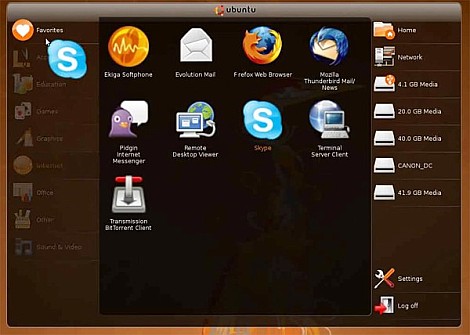
We had covered you on this with a Ubuntu installer for Windows called Wubi. However, you can also install Ubuntu as a native Windows application by using Portable Ubuntu Remix.

Portable Ubuntu Remix is build on Ubuntu 9.10 Karmic Koala and is built with Colinux Kernel, Xming X server and Pulseaudio server for Windows. If you are a Windows user who has been reading about Ubuntu, but haven’t had the time or expertise to install it, this is a good way to try out the system without breaking you head. Portable Ubuntu Remix only supports 32bit Windows PC.
Download Portable Ubuntu Remix
Labels:
Internet,
Software
at
11/30/2009 09:52:00 PM
Ubuntu 9.10 Karmic Koala is out. There is a good chance that you are planning to run Ubuntu along with the existing windows installation. In such a case, it becomes hard to free up space, move data and create a new partition for installing Ubuntu. The solution lies in using Wubi.

Wubi is a free open source application licensed under GNU and is an acronym for Windows Ubuntu Installer. For information on Wubi, visit this post by Keith.
Using Wubi is pretty simple.
It prompts for a username password, installation location and size.

There are options to select the desktop environment and the install language as well.
After installation is complete, this install location is mounted as a boot disk and presented as boot option when the system boots, allowing you to dual boot into either your native Windows system or the Ubuntu system you just installed.
The biggest advantage is that with Wubi, we can install Ubuntu anywhere. There is no need to manually change the bootloader, edit the boot process or create any partitions to dual boot.
The only drawback is a slight reduction in disk performance which can be overlooked if you are not performing continuous disk I/O.
Download Wubi here.

wubi
Using Wubi is pretty simple.
It prompts for a username password, installation location and size.
wubi-installer
After installation is complete, this install location is mounted as a boot disk and presented as boot option when the system boots, allowing you to dual boot into either your native Windows system or the Ubuntu system you just installed.
The only drawback is a slight reduction in disk performance which can be overlooked if you are not performing continuous disk I/O.
Download Wubi here.
Labels:
Internet,
Software,
Web
at
11/29/2009 09:40:00 PM

Watch out Chrome OS, Jolicloud means business. The cloud-based netbook operating system is feeling the heat and stepping it up, announcing their pre-beta release late last week.
So, why is Jolicloud worth a look? Compatibility with "almost every netbook" is a good first step. In addition, the developers are touting a really fresh and updated UI and an entirely cloud-based structure. The pre-beta release adds some cool functionality including a much easier installation process.
Originally only available for install via a USB stick or .ISO image, Jolicloud's developers are planning to release "Jolicloud Express", a way to partition your drive and install the OS right on top of your Windows installation. This makes removing it nice and easy and simplifies some issues people have been having with the installation.
The developers are really excited about the release and will be pushing out more invitations soon. When asked why they're building it, they had one thing to say:
The convergence of the cloud, mobile connectivity and affordable netbooks is powering a computer revolution that everyone can be part of. Together let's build Jolicloud and make it one of the driving forces in this revolution.
Labels:
Internet,
Software
at
11/28/2009 05:48:00 AM
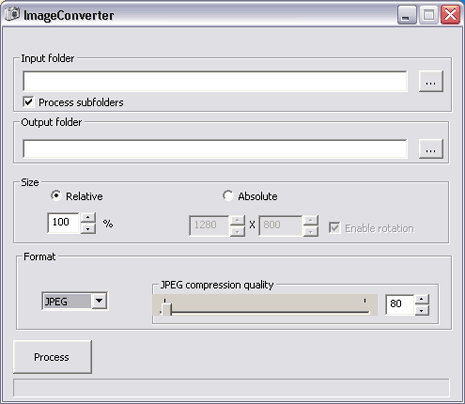
If you deal with images all the time and are on constant move, then checkout free portable ‘Image Converter’ software to resize photos on the fly.
Photo resizing using Image Converter
1. Download Image Converter program on computer.2. Unzip downloaded file, double click to launch the program.
3. Select the Input and Output folder for images.
5. Click Process button for quick resizing of photos as per specified settings.
That's simple right.like it subscribe my blog now and leave some comment.
Labels:
Internet,
Software,
Web
at
11/25/2009 07:14:00 PM

Direct2D is a technology included in Microsoft's DirectX multimedia tools. Usually you would only experience the power of DirectX in playing games, but it seems we're finally going to see extensive use of DirectX in office and home use -- the next few months and years will see significant speed-ups to your general computer use and Internet browsing.
Whether this is simply a reaction to the announcement of IE9, or if Firefox had been intending to include D2D support all along, I guess we'll never know. One thing's for certain though, the fast-moving nature of Firefox and Chrome development has played a large part in nibbling away at Internet Explorer's market share.
Labels:
Internet,
Software,
Web
at
11/25/2009 02:47:00 AM

Have you Experience the portable web browser. its cool you know .You can put it in you Flash drives.Web browser is a basic software program to surf internet websites. Majority of internet surfers use Internet Explorer or Firefox browser to open and browse websites.
1. Opera portable
 It is most glitzy and stylish web browser to surf the internet. Now you can relish Opera browser in portable format that does not invovle any file installation.
2. Portable Firefox
 You can download portable Firefox and carry it any where in a USB drive to surf internet without having to worry about leaving internet history or traces behind.
3. QtWeb portable
 It is a free light weight web browser with loads of features like save as PDF, virtual keyboard and more.You can just download QtWeb portable and launch the file for your very own portable web browser. Surf internet without leaving any trace from CD, DVD or USB drive.
4. Maxthon portable
 It is a powerful tabbed browser with a highly customizable interface. It supports Mouse Gestures, Super Drag & Drop, Privacy Protection, RSS Reader, IE Extensions Support and Skinning. Download this portable Maxthon
 5. Portable Google Chrome
 You can test drive the portable version of Chrome (though its little rough). Chrome being still under active development, there are not many features to play around (when compared to Firefox).
Labels:
Internet,
Web
at
11/22/2009 08:17:00 PM
You can test drive the portable version of Chrome (though its little rough). Chrome being still under active development, there are not many features to play around (when compared to Firefox).
Labels:
Internet,
Web
at
11/22/2009 08:17:00 PM

Download The Template[Click the button ]
Preview
More Details
Install The Template
Please Sign In to Blogger
Go to LAYOUT -- Edit HTML
If You need to back up your old templates, please do the back up first.
Upload The Zinmag Chronicle XML Files.
Click the Upload button.
Save your template.
Customize The Logo

Go to Layout – Edit HTML – no need to expand widget template
Find this image address :
The logo use image file. The size is 243 pixels width and 51 pixels height.
Please make customization in image editor. After you make your own logo, Upload it into webhosting and get the link address.
After that, replace the above address with your own image address that you get in your webhosting.
Labels:
Internet,
Web
at
11/22/2009 07:02:00 PM

It seems it’s the age old enigma as far as computers and the Internet goes: How can I send (or store) a large file? Many services have limitations set up. For instance, many email providers won’t allow file attachments larger than 10 MB. These days that’s not much, is it? Many services allow larger file sizes and capacities… for a price.
Well, here at MakeUseOf we are more interested in service that are FREE. Other MakeUseOf writers have written some articles that can help. Let me share with you a free solution that includes file sharing AND storing: GoAruna. GoAruna has several benefits, two of which are unlimited, free web storage space (the size limit for each file appears to be 100MB) and ease of use. In this post, I would like to share some of the capabilities of this site and how they may be helpful.
File Storage
As I mentioned earlier, GoAruna sports a handy UNLIMITED total file storage limit! This is cool because you can save as many files as you like! There is a downside. As far as I can tell by searching through the feedback forums is that the size limit for individual files is 100 MB. I hate limitations! But it’s a LOT better than the 10 MB limit email puts on us, right?Personal Drop Box

GoAruna also has this nifty feature that allows you to set up a drop box where others can come by and upload a file to you. Tight! Someone else have a file that you need? Have them send it to your personal space without having to offer them access to everything. Many possibilities here, right? Can help in a pinch!
Send Files (even securely)
There are two ways to send files: choose a file you’ve already uploaded…
…OR send a file quickly from the front page without signing up for an account.

When you send a file, you are actually emailing a link to someone to click and download the file. Here’s an example of the email they will receive:

Now that you know a bit about what GoAruna has to offer, let’s take a run through to see just how easy it really is to use! Once you sign up and sign in, click “upload file”

The next step will become obvious when the “upload file” window pops up — click “browse” to choose your file.

The next step is waiting… with patience. Depending on the file’s size, this could take time.

And that’s about all it takes! Very easy to do! See, you don’t REALLY have to be a geek to send large files! You can pretend to be and tell the receiver of your files how difficult it was and that you wouldn’t recommend them trying it. That wouldn’t be honest though, would it?
What do you think of GoAruna? What other ways do you have for storing and sharing large files on the Internet? We’d be grateful to learn!


 Alexa Rank


