Showing posts with label Software. Show all posts
jolicloud-260x190
When it comes to lightweight operating systems for a netbook or smartbook (which is basically a netbook that runs an ARM processor — expect to see them early next year), much of the recent buzz has centered around Google’s Chrome OS.
However, if you have a netbook and you want to try something that has a lot of the Web-integration features that Chrome OS promises ASAP, check out Jolicloud. Jolicloud is a Linux-based OS designed specifically for netbooks. The pre-beta is now available and it looks pretty great.


Look and Feel Jolicloud


I’ve only had a chance to play with Jolicloud on a virtual machine (I hope to try it on a netbook sometime this weekend), but I’m impressed with the look and feel. The problem I have with many netbook-specific Linux distributions is that, although the application launcher and desktop might be well-formatted for a small screen, the apps themselves still don’t take advantage of small spaces as well as they should.
jolicloud
Thus far, only Intel’s Moblin project has really addressed the issue of small spaces. Jolicloud was started by Tariq Krim, the founder of Netvibes. This is important because Netvibes has always had a good sense of UI and space allocation.
Jolicloud has a slew of Web and native applications. It can also run Adobe Air apps and play back many types of video.Jolicloud Rocks!!!
Read More>>>>

The Future


Jolicloud hopes to have it first full version out in early 2010. From the looks of things, they are really close to an official release.
How Jolicloud will hold up against competitors like Ubuntu Netbook Remix, Intel’s Moblin, and, of course, Google Chrome OS, has yet to be seen — but for users of netbooks, the options for browser-centric, low-profile operating systems are growing.
While Chrome OS has been getting the lion's share of netbook/smartbook buzz of late, Tariq Krim and company have been steadfastly plugging away at Jolicloud.

Today, the Jolicloud pre-beta has been released and it's ready for the general public to install on their Windows netbooks.

Jolicloud's Wubi-derived installer make the process dead-simple. Download the 600Mb .exe [or the torrent] from their website, launch it, and make your selections. Within a few moments you're system can dual-boot into Jolicloud or Windows.

While I suppose it's technically not fair to compare Jolicloud and Chrome OS right now since Chrome is so early in the alpha stage, I'm going to anyway. Right now - and for the near future - Jolicloud is the winner in my mind because it supports both native and web-based applications equally well.

"Sure, but Jolicloud uses Firefox and Firefox is slooooooooooow!" you say? Fine, go grab the Google Chrome beta for Linux and install the 32-bit .deb on Jolicloud. There. You've got a nice, fast, webkit-based browser - just click in from your internet apps tab.
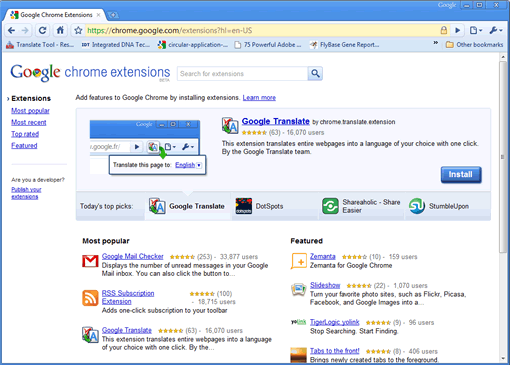
Google's extension gallery for its Chrome browser opened for business this morning. We've taken a look around the offerings—most of them, anyways—and pulled out a few picks that deserve a spot in your formerly pristine browser.
Actually, rating these extensions by "worth the slowdown," as is often the case with Firefox, doesn't seem applicable here. Chrome renders pages just as snappily on a Linux install with eight extensions loaded, and the memory use seems not all that different. Your mileage may certainly vary.
We pulled out extensions from the gallery for highlighting that do something a bit different from widely-available bookmarklets, or at least fill a crucial need for those who use the web productively. You can disagree with our picks or tell us how blind we must be to miss a great one—do so in the comments, and if we missed a really great one, we'll update the post.
You need to be running either the Windows dev version of Chrome, the just-released Linux beta, or a daily build that supports extensions. Mac users are, unfortunately, left out of the add-on party for the moment.
 
Google Mail Checker: Just what it sounds like. It sits in your address bar, keeps track of your unread messages, and opens Gmail when you click it. Take note that the author states it "does not yet work well" with Google Apps mail.
 
RSS Subscription Extension: Puts an RSS icon in the address bar when standard feeds are detected, and delivers the feed to a reader selection page when clicked. You can add custom readers beyond the standard five using URL syntax.
 
Xmarks for Chrome Beta: Just like the early Chrome alpha, this extension ties Chrome into your Xmarks bookmark account, synchronizing you between Chrome, Firefox, Safari, Internet Explorer, and across multiple profiles, if needed.
 
iMacros for Chrome: We haven't had nearly enough time to discover what this cool tool is capable of, but it seems like a nice solution for anyone missing their crucial Greasemonkey scripts and other Firefox-only helpers.
Aviary Screen Capture and Picnik Extension for Chrome: We've already spilled some digital ink on the neat Aviary extension, but Picnik does the same type of instant web page capture—and also lets you pick a particular image from a quick list that pops down.
Flash Block and FlashBlock: Both do the basic task of turning off Flash on all web pages, until you turn it back on for all pages from that domain. FlashBlock uses a keyboard shortcut, while Flash Black has a settings dialog with a list you can edit.
 
AdThwart and AdSweep: As you might guess, they both block ads, though they use different blacklists to do so. We've previously covered AdSweep in its early days. At the moment, AdSweep's gallery page returns an installation failure—from Linux, at least. AdThwart is proving more popular, perhaps due in part to AdSweep's troubles.
Brizzly: The helpful, time-saving, at-a-glance Twitter/Facebook client for the web integrates smoothly into Chrome. Click the button, and you get a quick read on what's happening in your social streams, with images automatically shown and videos embedded. You can, of course, also tweet or update Facebook from here.
 
Google Voice Notifier, Google Wave Notifier, and Google Alerter: The first two do just what you'd think they do, but make lots of sense for services you want right away and might only occasionally check, respectively. The last is a kind of uber-notifier that checks Gmail, Wave, and Reader for new items. If you're a heavy Reader user, you'll obviously want to turn those pings off in the settings.
Chromium Delicious Plugin: All your recent bookmarks from the Delicious bookmark service, as well as quick saving of bookmarks from selected text/links or manual creation.
 
ChromeMilk: There are many, many tools that bring to-do manager Remember the Milk into your browser, but this one's notable for popping up your task list right from the address bar—and offering Remember the Milk's very slick iPhone interface as an option for pro membership owners.
Along with the Google Chrome for Mac and Linux versions today Google also announced the availability of extensions in beta. If you are running a beta version of Google Chrome you can install extensions now. The extensions are available for both Windows and Linux versions from today, but Mac users have to wait a while to get the extensions.
google-chrome-extensions
Lack of extensions on Google Chrome is one of the reason many Firefox fans are reluctant to move to Google Chrome although chrome is speedier than Firefox. Today with the launch of extensions Google chrome will gain some Firefox fans also. Google has launched an extensions gallery which contains 300 extensions as of now, but the number will increase soon as more people install extensions and this will boost developer activity.
If you are worried about Google chrome speed after installing extensions, Google says ”Chromium’s extensive performance monitoring infrastructure has helped us ensure extensions affect Google Chrome’s speed as little as possible.” So that’s a good news, but we will know for sure in the coming days how the extensions are affecting the overall speed of the Google Chrome browser.
Installing extensions is easy, no need of restarting the browser like Firefox. Click the install button and you are good to go.
Google Chrome Extensions Gallery
CursorMover is a free tool for moving mouse cursor using Arrow keys. Virtual mouse clicking can be done with ‘M’ key (repeatedly clicking M will enable or disable the mouse clicking), quite useful when your mouse suddenly stop working.Of course you can use shortcut key ‘Alt + Left Shift + NumLock’ to enable Windows own utility for moving cursor, but it is not smooth like this tool.
With this utility you can speedup the cursor move by choosing 1px, 2px or 5px and pushing 'M' will allow you to toggle virtual mouse clicking. Pushing NUMLOCK will give you the current coordinates of the current cursor positions.
CursorMover works with Windows7, Vista and XP.
Download CursorMover
Cherry is a chrome OS mod released by Hexxeh, a Chrome OS developer. The cherry OS has many advantages over the default Chrome OS. It has a small size of 300 MB. Not only this, it fits into a USB drive of size 1 GB unlike the original build, which requires at least a 4 GB USB drive.
chrome-os-cherry
In addition to that, it now includes out of the box support for Wi-Fi. Wi-Fi was initially unavailable on Chrome OS and is still unavailable. It can be enabled by copying the Wi-Fi firmware from your default Ubuntu or Ubuntu based installation, to a folder in the Chrome OS USB-drive. All that trouble has been done away with in the Cherry build of the Chrome OS.
The OS can be tried on any netbook, laptop or desktop. It is available as an image file that can be written to a USB drive using an appropriate tool. Windows users can refer to this page for help on making a bootable Chrome OS image. The default username and password for Cherry OS is facepunch.
There are three download links on this page. One is a torrent download, others are HTTP links. The download is absolutely free. As the homepage says, you can report any bugs to @Hexxeh on twitter.
Chrome OS being Ubuntu based, is highly customizable and is fast developing. This parallel build of Chrome OS is a big hit and Wi-Fi support appearing on it even before on the Chrome OS itself is a positive response from the open source community on Chrome OS.

The Windows 7 Family Pack was a great offer, bundling three full Home Premium upgrades for $150. It was also a limited time deal, but without a set terminus. Well, now we have an expiration date: gift-buying season.
Paul Thurrott traces the arc from start to finish:
When Microsoft first briefed me about the Family Pack back in July, I was told that it would be a limited-time offer "until supplies last" (sic) in the United States and "other select markets." I communicated Microsoft plans for the Family Pack in various articles over the next few months, noting that it was a temporary offer only.
Unfortunately, that's just now becoming obvious to potential customers here in the United States, where the Family Pack has apparently completely disappeared. Numerous email messages this week complain that attempts to find the Windows 7 Family Pack online or at brick-and-mortar electronics retailers have proven fruitless, killing plans for planned holiday presents.
In other words, stocks have run dry, as Microsoft said they eventually would. Minor issue! Seeing as Windows 7 is software, any limit on the supply is totally self-enforced. It's possible that they set aside a certain number of licenses at launch, and they've just burned through them faster than planned. It's also possible that they planned this arbitrary supply excuse so they don't look like assholes when the cost of upgrading a household's worth of PCs to Windows 7 suddenly doubles right before Christmas.
How am I supposed to tell my parents I love them this Christmas, if not with a box of vouchers for OS upgrade licenses? [WinInfo]
In case you're interested in upgrading to Win 7 (you should be, BTW), and want to get the rest of the family in on that action, know that the Windows 7 family pack will offcially cost $149.
The Family Pack upgrade will net you three copies of Home Premium edition for legal consumption—BUT WAIT...there's more! Also know that single license upgrades from Starter to Home Premium will run you about $80, Home Premium to Professional will go for $90, and if you ACT FAST and call in the next FIVE MINUTES (just half the time it takes to upgrade!), going from Professional to Ultimate will cost $140.
These prices are all in the ballpark of what was rumored earlier in the month, though no mention has been made of a pre-release promotional discount. [Cnet via Engadget]

Earlier in the month,I had post a tip on how to recover your Windows XP administrator password by using the installation disk.  However, he forgot to mention a few other easier ways how to reset Windows XP password without having to go through the installation process.

1. Use Alt, Control, Delete & The Windows Welcome Screen

If you have set your computer up to login via the Welcome Screen, there may be a slight chance that you will be able to login as the Administrator. Depending on who installed XP on your computer, there may or may not be a password on the Administrator’s account.
So simply press Alt+Control+Delete twice. You will be presented with a login box. Click OK to login without typing any user name or password in. If that doesn’t work, type in ‘Administrator’ into the username box and press enter. If that doesn’t work, so far, you are in bad luck.
If you are able to log in, simply go to the control panel, go into User Accounts and change your password.

2. Login To Another Account & Reset The Password Through User Management (XP Professional Only)

This will only work if you have Windows XP Professional, and you can login with an account. Right click on My Computer and select Manage. Then select Local User and Groups –> Users. Right click on your username and select Set Password. Follow the prompts and set yourself a new password.
If you can’t get into Device Manager because you don’t have a user account to get into your computer, you can try opening Device Manager from another computer. Right click on where it says Computer Management (Local) and choose Connect to another computer… once you are logged in to another computer within your home network.
how to reset Windows XP password
Then enter your computer IP or Name. For example 169.168.x.x, 10.1.1.x or \\DesktopPC. (replacing x.x with your computer IP address. You can also click on Browse –> Advance –> Find now to browse for computers on your network.
how to reset Windows XP password
If you are granted access to the remote computer, follow the steps I mentioned above and set a new password. If not, continue reading.

3. Reset The Password Through Safe Mode & Command Prompt

If the above steps have failed so far, you can try and boot into Safe Mode. To do this, press F8 while your computer is booting. Once in safe mode, you can try going into the control panel and reset your password. If you can’t, you can try and open up a Command Prompt by opening Run and typing cmd. Enter net user [username] [enternewpassword]. For example, If I want to change my account which is Jack to password abcde, I would type in net user jack abcde and press enter. Your password should now be changed.
how to reset Windows XP password

4. Use A Live (Bootable CD)

If you are at this stage, and haven’t so far managed to get into your computer, you may want to use a Live Bootable CD. You may want to have a look at the post 3 Ways To Reset A Forgotten Windows Administrator Password and follow those steps.
Alternatively, you can use the Live CD so you can boot into your computer and access the files so you can back them up on an external hard drive or USB stick. If you can’t get into Windows, this is your only option.

5. Remove Your HardDrive, Backup, Format, Reinstall

One final way, and probably a good thing to do if your computer is running really slow, or you can’t get into Windows at all; take out your hard drive, put it into another computer, backup your data, format the hard drive, put it back into the original computer, and re-install Windows. You may want to have a look at The Idiot’s Ultimate Guide to Building Your Own PC for some help taking out your hard drive.
So these are my basic tips if I can’t get access to a computer to a user account in a Windows XP computer. I hope these tips will come in handy.
Do you have any other tips to get access to your computer because you forgot the password? Let us know in the comments.
We know that Avast! is popular for its free anti virus product which is being used widely. Avast has now launched a new product, Avast! Internet Security, which is currently in beta phase and available for testing. This free beta product is now available for Windows XP, Vista and Windows 7 users (both 32 bit and 64 bit versions). The new product includes all the features of the free antivirus and also includes added features like Firewall, antispam etc.
Avast-Internet-Security_1
Avast-Internet-Security_2
Features of Internet Security Suite (Apart from AV);
  • Firewall
  • Antispam
  • Process virtualization
  • High performance antivirus engine
  • Anti-root kit protection
  • Anti-spyware protection
The application provides you with real time virus protection for your PC. Avast! Internet Security includes a fully integrated antispam filter to detect unwanted email.
You can download the latest beta build to check out the features.
Download Avast! Internet Security (Beta Version)
http://zeirus.files.wordpress.com/2008/06/ubuntunetbookremix_3.jpg
We had covered you on this with a Ubuntu installer for Windows called Wubi. However, you can also install Ubuntu as a native Windows application by using Portable Ubuntu Remix.
portable_ubuntu_remix
Portable Ubuntu Remix is build on Ubuntu 9.10 Karmic Koala and is built with Colinux Kernel, Xming X server and Pulseaudio server for Windows. If you are a Windows user who has been reading about Ubuntu, but haven’t had the time or expertise to install it, this is a good way to try out the system without breaking you head. Portable Ubuntu Remix only supports 32bit Windows PC.
 
Download Portable Ubuntu Remix

Ubuntu 9.10 Karmic Koala is out. There is a good chance that you are planning to run Ubuntu along with the existing windows installation. In such a case, it becomes hard to free up space, move data and create a new partition for installing Ubuntu. The solution lies in using Wubi.
wubi
wubi
Wubi is a free open source application licensed under GNU and is an acronym for Windows Ubuntu Installer. For information on Wubi, visit this post by Keith.
Using Wubi is pretty simple.
It prompts for a username password, installation location and size.
wubi-installer
wubi-installer
There are options to select the desktop environment and the install language as well.
After installation is complete, this install location is mounted as a boot disk and presented as boot option when the system boots, allowing you to dual boot into either your native Windows system or the Ubuntu system you just installed.


The biggest advantage is that with Wubi, we can install Ubuntu anywhere. There is no need to manually change the bootloader, edit the boot process or create any partitions to dual boot.
The only drawback is a slight reduction in disk performance which can be overlooked if you are not performing continuous disk I/O.
Download Wubi here.


Watch out Chrome OS, Jolicloud means business. The cloud-based netbook operating system is feeling the heat and stepping it up, announcing their pre-beta release late last week.

So, why is Jolicloud worth a look? Compatibility with "almost every netbook" is a good first step. In addition, the developers are touting a really fresh and updated UI and an entirely cloud-based structure. The pre-beta release adds some cool functionality including a much easier installation process.

Originally only available for install via a USB stick or .ISO image, Jolicloud's developers are planning to release "Jolicloud Express", a way to partition your drive and install the OS right on top of your Windows installation. This makes removing it nice and easy and simplifies some issues people have been having with the installation.

The developers are really excited about the release and will be pushing out more invitations soon. When asked why they're building it, they had one thing to say:

The convergence of the cloud, mobile connectivity and affordable netbooks is powering a computer revolution that everyone can be part of. Together let's build Jolicloud and make it one of the driving forces in this revolution.
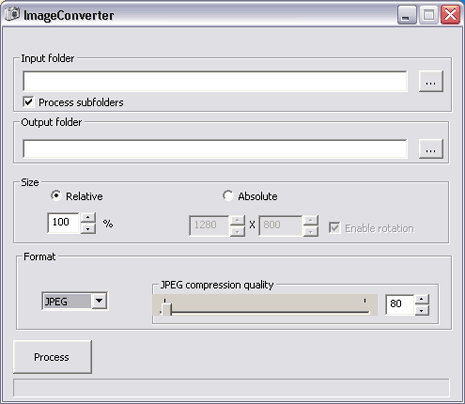
image-converter-portable


 If you deal with images all the time and are on constant move, then checkout free portable ‘Image Converter’ software to resize photos on the fly.

Photo resizing using Image Converter

1. Download Image Converter program on computer.

Click the button


2. Unzip downloaded file, double click to launch the program.
3. Select the Input and Output folder for images.

4. Select size, output image format, JPEG quality for resizing process.
5. Click Process button for quick resizing of photos as per specified settings.

That's simple right.like it subscribe my blog now and leave some comment.
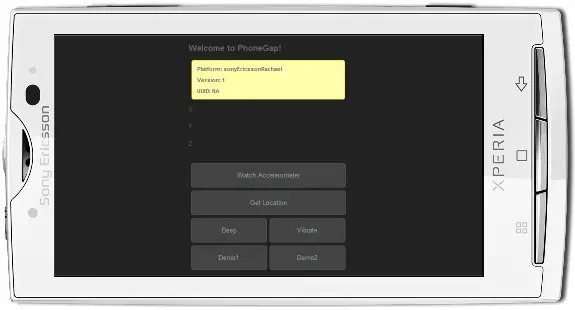
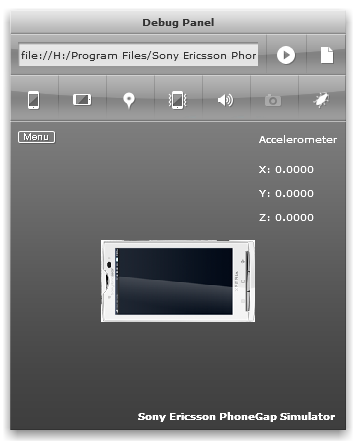
Sony Ericsson PhoneGap Simulator is an Adobe AIR application that is easy to install and enables you to easily check the look and feel of your applications.
It enables you to check your application in the true device environment by using the emulators provided with the Android and Symbian SDKs.

Features of Sony Ericsson PhoneGap Simulator

1. Firebug Lite – monitor, edit and debug HTML, CSS and JavaScript in real time
2. Geolocation Console – uses the Google Maps API to simulate GPS location values
3. Accelerometer Console – Tilt and rotate a virtual phone to create simulated 3d x,y, z values
4. Sound and vibration simulation
5. Skins for XPERIA X10 and Satio phones

Sony Ericsson Phone Simulator


Sony Ericsson Phone Emulator Xepria

Sony Ericsson Phone Simulator


Download Sony Ericsson PhoneGap Simulator{Click the button}
Credit to Bas Schouten. Grabbed from the CNET article in the via.
Hot on the heels of the announcement that IE9 would use Direct2D to improve its rendering performance, Firefox have stated their intent to do the same -- and sooner! In a a tweet, Chris Blizzard, an employee of Mozilla, said that Firefox would include Direct2D support -- and he bet it would be shipped sooner than IE9!

Direct2D is a technology included in Microsoft's DirectX multimedia tools. Usually you would only experience the power of DirectX in playing games, but it seems we're finally going to see extensive use of DirectX in office and home use -- the next few months and years will see significant speed-ups to your general computer use and Internet browsing.

Whether this is simply a reaction to the announcement of IE9, or if Firefox had been intending to include D2D support all along, I guess we'll never know. One thing's for certain though, the fast-moving nature of Firefox and Chrome development has played a large part in nibbling away at Internet Explorer's market share.
http://www.getbrowser.net/wp-content/uploads/2009/09/portable-web-browsers.jpg
 Have you Experience the portable web browser. its cool you know .You can put it in you Flash drives.Web browser is a basic software program to surf internet websites. Majority of internet surfers use Internet Explorer or Firefox browser to open and browse websites.

1. Opera portable

opera-logo-portableIt is most glitzy and stylish web browser to surf the internet. Now you can relish Opera browser in portable format that does not invovle any file installation.

2. Portable Firefox

firefox-portable You can download portable Firefox and carry it any where in a USB drive to surf internet without having to worry about leaving internet history or traces behind.

3. QtWeb portable

qtweb-portableIt is a free light weight web browser with loads of features like save as PDF, virtual keyboard and more.You can  just download QtWeb portable and launch the file for your very own portable web browser. Surf internet without leaving any trace from CD, DVD or USB drive.

4. Maxthon portable

maxthon-portableIt is a powerful tabbed browser with a highly customizable interface. It supports Mouse Gestures, Super Drag & Drop, Privacy Protection, RSS Reader, IE Extensions Support and Skinning. Download this portable Maxthon

5. Portable Google Chrome

google-chrome-portableYou can test drive the portable version of Chrome (though its little rough). Chrome being still under active development, there are not many features to play around (when compared to Firefox).


Moto Racer 1 | Rip 26MB

Overview : Motorcycle racing games have been a favorite in old arcades for several years. You know which games I mean the ones where there an actual motorcycle body you can sit on and you really have to lean into the turns. The illusion of racing a bullet bike at breakneck speeds is sometimes irresistible. Even better are the arcades that have several machines linked for multiplayer racing. This style of game has been mostly an arcade-only experience until now. Moto Racer brings the adrenaline rush to the PC, and even though it still has a long way to go to match the full arcade machines it was still lots of fun to play, especially with friends.
http://games.softpedia.com/screenshots/Moto-Racer_2.jpg
http://games.softpedia.com/screenshots/Moto-Racer_1.jpg


http://i28.tinypic.com/2n2haa.jpg

Obit Security 360 is an advanced malware and spyware removal utility that detects, removes and protects your PC from various of potential spyware, adware, trojans, keyloggers, bots, worms, and hijackers.With the unique "Dual-Core" engine and the heuristicmalware detection,IObit Security 360 detects the most complex and deepest spyware and malware in a very fast and efficient way.

IObit Security 360 has a real-time malware protection and frequent automatic updating for prevention of zero-day security threats. IObit Security 360 can work with your Antivirus for a superior PC security.
Features:
* Complete PC Security Care
* 1-click Solution and Very Easy to Use
* Very Fast and Light
* Finds the Deepest Infections
* Automatic and Frequent Updates
* Work with All Antivirus Products
* Free for Home/Non-commercial Use

 
Zionn designed by ZENVERSE | Converted by Blogger Template Place Collaboration One-4-All